How it works
From sign-up to payout, with the actual numbers attached.
Create and activate your account.
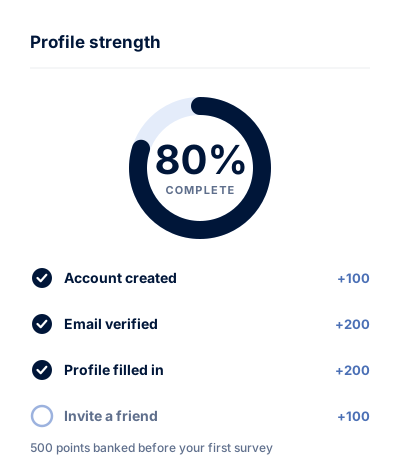
Sign up with an email address you actually check. We send a confirmation link straight away — clicking it activates the account and proves the address is yours, which is what stops duplicate and bot accounts diluting the panel.
You are paid for both halves: 100 points for registering and 200 points for activating.
Fill in your member profile.
The profile asks about the things studies screen on: your age bracket, where you live, your household, the categories you buy in, the devices and services you use. It is the single highest-value thing you can do on the panel, because it decides which invitations reach you.
Skip it and you will still get invitations — just far more of the kind that screen you out three questions in. Complete it and you get 200 points, plus noticeably better matching.
Keep it current. When you move, change jobs, or your household changes, update it. An out-of-date profile is the most common reason members get screened out.

Answer studies that match you.
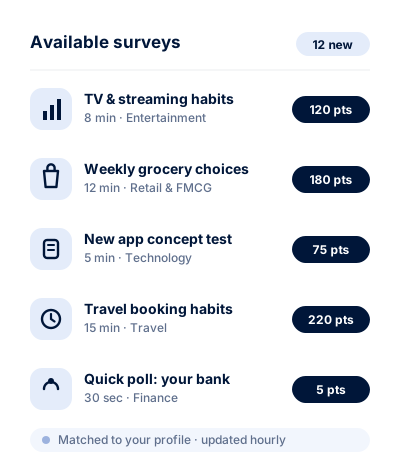
We email you when a study fits your profile, and everything waiting for you is also listed in your dashboard. Each invitation states two things before you click: the points on offer and the expected length.
Most studies take five to twenty minutes and pay 50 to 500 points, scaling with length and how specific the audience is. Quick single-question polls pay 5 points and take seconds.
There is no obligation attached to any of it. Ignore an invitation and nothing happens — no penalty, no reduction in future invitations.
Sometimes a survey ends early.
It is the most common frustration on any panel, so it deserves a straight answer rather than a footnote.
Every study needs a specific mix of people — say, 200 people who bought a car in the last year, spread across age groups. The opening questions check whether you belong to a group that still has room.
If your group is already full, the survey closes. That is a screen-out, and it is about quotas, not about you or the quality of your answers.
What we will not do is pretend screen-outs never happen. They do, on every panel, including this one.
Redeem your points.
Points land in your balance once a study is validated — usually within 48 hours, occasionally longer where there is a manual quality check.
At 5,000 points you can cash out. That is $50, because every point is worth $0.01 and that never changes.
Choose PayPal, a gift card, streaming credit or a charity donation at the moment you redeem. Most payouts arrive within three business days of approval.
See all rewards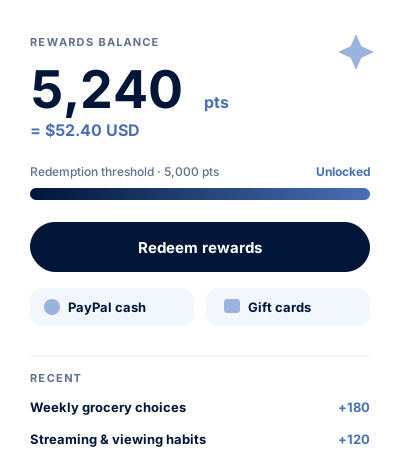
Every rate, published
| What you do | You earn |
|---|---|
| Create your account | 100 pts $1.00 |
| Activate it from your inbox | 200 pts $2.00 |
| Complete your member profile | 200 pts $2.00 |
| Answer a quick poll | 5 pts $0.05 |
| Complete a survey | 50 to 500 pts varies by length |
| Refer a friend who joins | 100 pts $1.00 |
| Your referrals complete surveys | 10% of what they earn, on us |
How quickly you reach the threshold depends on how many studies you match with, which depends on your profile and location. We are not going to put a weekly figure on it, because for most people it would be wrong.

Start at 500 points, not zero.
Registration, activation and profile completion are all paid. Two minutes of setup puts $5.00 in your balance.
Join Earn with Core